Introduction to Analysis Results Datasets (ARDs)

Including Integrations with {gtsummary}

Daniel D. Sjoberg

Introduction

Outline

  • Analysis Results Standard (ARS) and Analysis Results Data (ARD)

  • {cards} R package

  • {cardx} R package

  • Tabling with {gtsummary}

Analysis Results Standard

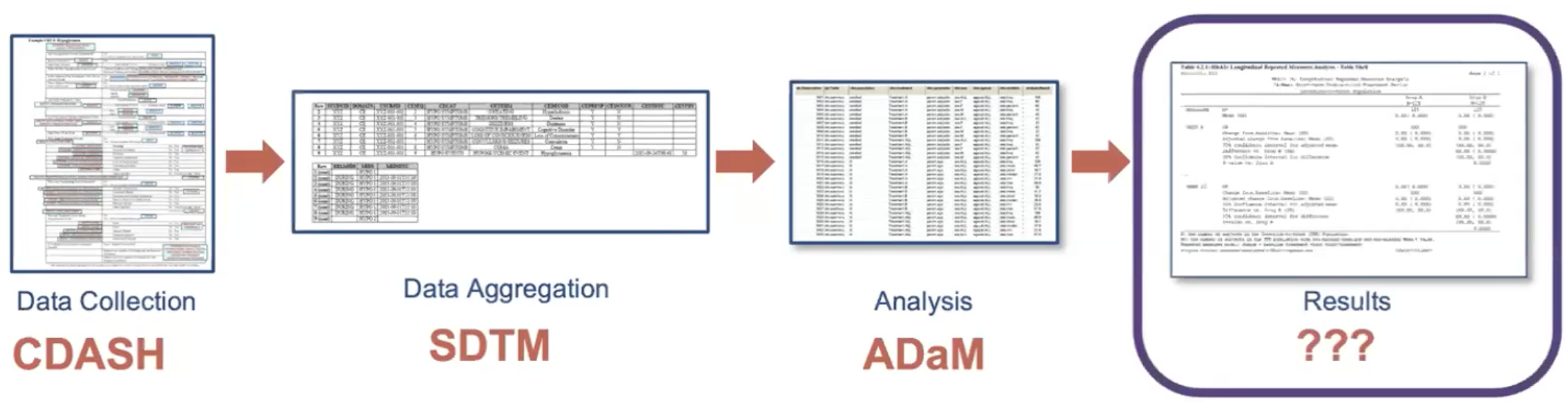
Analysis Results Standard (ARS)

Analysis Results Standard (ARS)

  • Emerging standard for prospectively encoding statistical analysis reporting pipeline in a machine-readable format.

  • Primary objectives are to leverage analysis results metadata to drive the automation of results and support storage, access, processing, traceability and reproducibility of results.

  • Logical model that describes analysis results and associated metadata.

  • Focus on concepts, not layout, e.g. the summary statistics, not how the results are shown in a table.

  • Learn more at https://www.cdisc.org/events/webinar/analysis-results-standard-public-review

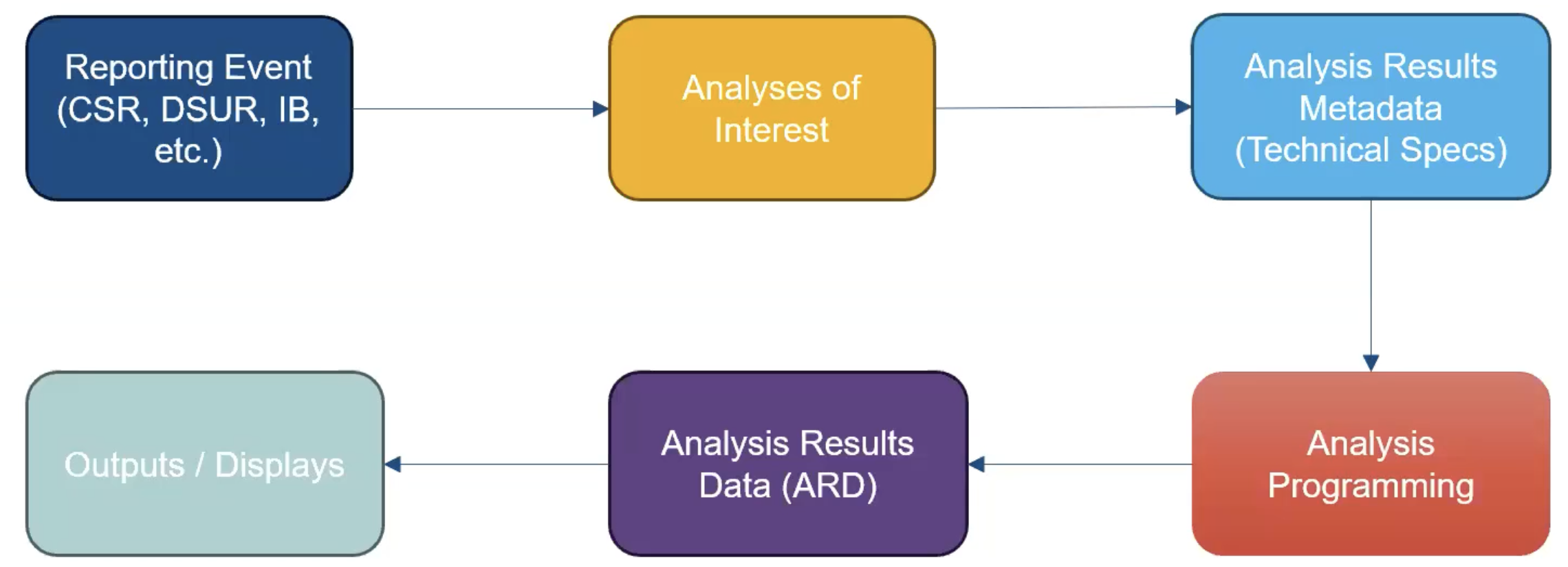
Analysis Results Standard (ARS)

Example ARS Flow

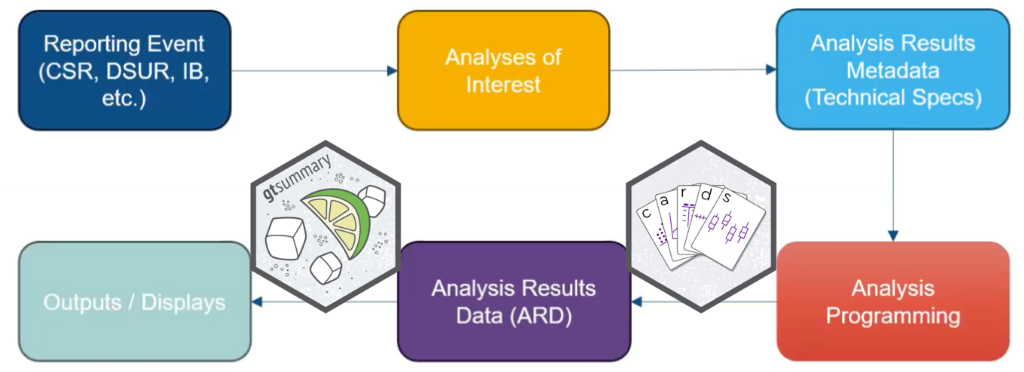
Analysis Results Standard (ARS)

Example ARS Flow

Analysis Results Data (ARD)

  • Encodes statistical analysis outcomes in a machine-readable format.

  • Primary objective is to streamline the processes of automation, ensuring reproducibility, promoting reusability, and enhancing traceability.

  • The ARD model specified how statistical results are saved into a structured format.

  • The ARD can be used to to subsequently create tables and figures.

Analysis Results Data (ARD)

  • After the initial creation of an ARD, the results can later be re-used again and again for subsequent reporting needs.

  • How else might one use ARDs? (This is not rhetorical…please participate.)

{cards}

{cards} R Package cards website

Let’s check out a simple example

library(cards)

# create ARD with default summary statistics
ard_continuous(ADSL, variables = AGE)
{cards} data frame: 8 x 8
  variable   context stat_name stat_label   stat fmt_fn
1      AGE continuo…         N          N    254      0
2      AGE continuo…      mean       Mean 75.087      1
3      AGE continuo…        sd         SD  8.246      1
4      AGE continuo…    median     Median     77      1
5      AGE continuo…       p25         Q1     70      1
6      AGE continuo…       p75         Q3     81      1
7      AGE continuo…       min        Min     51      1
8      AGE continuo…       max        Max     89      1
ℹ 2 more variables: warning, error

{cards}: ard_continuous() arguments

  • by: summary statistics are calculated by all combinations of the by variables, including unobserved factor levels

  • statistic: specify univariate summary statistics. Accepts any function, base R, from a package, or user-defined.

  • fmt_fn: Override the default formatting functions, e.g. when you need

ADSL |> 
  ard_continuous(
    variables = AGE,
    by = ARM,                               # stats by treatment arm
    statistic = ~list(mean = \(x) mean(x)), # return the mean
    fmt_fn = ~list(mean = 0)                # format the result
  ) |> 
  apply_fmt_fn() # add a character column of rounded results
{cards} data frame: 3 x 11
  group1 group1_level variable stat_name stat_label   stat stat_fmt
1    ARM      Placebo      AGE      mean       Mean 75.209       75
2    ARM    Xanomeli…      AGE      mean       Mean 74.381       74
3    ARM    Xanomeli…      AGE      mean       Mean 75.667       76
ℹ 4 more variables: context, fmt_fn, warning, error

{cards}: ard_continuous() statistics

tidy_ttest <- function(x){
  t.test(x) |> broom::tidy()
}
tidy_ttest(ADSL$AGE)
# A tibble: 1 × 8
  estimate statistic   p.value parameter conf.low conf.high method   alternative
     <dbl>     <dbl>     <dbl>     <dbl>    <dbl>     <dbl> <chr>    <chr>      
1     75.1      145. 1.33e-245       253     74.1      76.1 One Sam… two.sided  
ard_continuous(
  data = ADSL,
  variables = AGE,
  statistic = ~ list(tidy_ttest = tidy_ttest)
)
  variable   context   stat_name stat_label      stat fmt_fn
1      AGE continuo…    estimate   estimate    75.087      1
2      AGE continuo…   statistic  statistic   145.119      1
3      AGE continuo…     p.value    p.value         0      1
4      AGE continuo…   parameter  parameter       253      1
5      AGE continuo…    conf.low   conf.low    74.068      1
6      AGE continuo…   conf.high  conf.high    76.106      1
7      AGE continuo…      method     method One Samp…   <fn>
8      AGE continuo… alternative  alternat… two.sided   <fn>

{cards}: ard_categorical()

ADSL |> 
  ard_categorical(
    by = ARM,
    variables = AGEGR1
  ) |> 
  dplyr::filter(stat_name %in% c("n", "p")) |> # keep most common stats 
  print(n = 8)
{cards} data frame: 18 x 11
  group1 group1_level variable variable_level stat_name stat_label  stat
1    ARM      Placebo   AGEGR1            <65         n          n    14
2    ARM      Placebo   AGEGR1            <65         p          % 0.163
3    ARM    Xanomeli…   AGEGR1            <65         n          n    11
4    ARM    Xanomeli…   AGEGR1            <65         p          % 0.131
5    ARM    Xanomeli…   AGEGR1            <65         n          n     8
6    ARM    Xanomeli…   AGEGR1            <65         p          % 0.095
7    ARM      Placebo   AGEGR1            >80         n          n    30
8    ARM      Placebo   AGEGR1            >80         p          % 0.349
ℹ 10 more rows
ℹ Use `print(n = ...)` to see more rows
ℹ 4 more variables: context, fmt_fn, warning, error

Any unobserved levels of the variables will be present in the resulting ARD.

{cards}: ard_dichotomous()

ADSL |> 
  ard_dichotomous(variables = AGEGR1, 
                  value = ~ "<65") 
{cards} data frame: 3 x 9
  variable variable_level   context stat_name stat_label stat
1   AGEGR1            <65 dichotom…         n          n   33
2   AGEGR1            <65 dichotom…         N          N  254
3   AGEGR1            <65 dichotom…         p          % 0.13
ℹ 3 more variables: fmt_fn, warning, error

{cards}: Other Summary Functions

  • ard_hierarchical(): similar to ard_categorical(), but built for nested tabulations, e.g. AE terms within SOC

  • ard_complex(): similar to ard_continuous(), but the summary functions can be more complex and accepts other arguments like the full and subsetted (within the by groups) data sets.

  • ard_missing(): tabulates rates of missingness

The results from all these functions are entirely compatible with one another, and can be stacked into a single data frame.

{cards}: Other Functions

In addition to exporting functions to prepare summaries, {cards} exports many utilities for wrangling ARDs and creating new ARDs.

Constructing: bind_ard(), tidy_as_ard(), nest_for_ard(), check_ard_structure(), and many more

Wrangling: shuffle_ard(), get_ard_statistics(), replace_null_statistic(), etc.

{cards}: Stacking utilities

  • data and .by are shared by all ard_* calls

  • Additional Options .overall, .missing, .attributes, and .total_n provide even more results

ADSL |> 
  ard_stack( 
    .by = ARM,      
    ard_continuous(variables = AGE), 
    ard_categorical(variables = c(AGEGR1, SEX))
  )  
{cards} data frame: 78 x 11
   group1 group1_level variable variable_level stat_name stat_label   stat
1     ARM      Placebo      AGE                        N          N     86
2     ARM      Placebo      AGE                     mean       Mean 75.209
3     ARM      Placebo      AGE                       sd         SD   8.59
4     ARM      Placebo      AGE                   median     Median     76
5     ARM      Placebo      AGE                      p25         Q1     69
6     ARM      Placebo      AGE                      p75         Q3     82
7     ARM      Placebo      AGE                      min        Min     52
8     ARM      Placebo      AGE                      max        Max     89
9     ARM    Xanomeli…      AGE                        N          N     84
10    ARM    Xanomeli…      AGE                     mean       Mean 74.381
ℹ 68 more rows
ℹ Use `print(n = ...)` to see more rows
ℹ 4 more variables: context, fmt_fn, warning, error

{cards}: ard_hierarchical

This function specializes in calculating participant-level rates.

  • Levels of nesting are specified in variables, and rates will be returned for the lowest level variables

  • id helps to check that no duplicate rows exist within the c(id, variables) columns

  • denominator dictates the denominator for the rates

ard_hierarchical(
  data = ADAE |>
    dplyr::slice_tail(n = 1L, by = c(USUBJID, TRTA, AESOC, AEDECOD)),
  variables = c(AESOC, AEDECOD),
  by = TRTA,
  id = USUBJID,
  denominator = ADSL |> dplyr::rename(TRTA = ARM)
)
{cards} data frame: 2178 x 13
   group1 group1_level group2 group2_level variable variable_level stat_name
1    TRTA      Placebo  AESOC    GASTROIN…  AEDECOD      ABDOMINA…         n
2    TRTA      Placebo  AESOC    GASTROIN…  AEDECOD      ABDOMINA…         N
3    TRTA      Placebo  AESOC    GASTROIN…  AEDECOD      ABDOMINA…         p
4    TRTA    Xanomeli…  AESOC    GASTROIN…  AEDECOD      ABDOMINA…         n
5    TRTA    Xanomeli…  AESOC    GASTROIN…  AEDECOD      ABDOMINA…         N
6    TRTA    Xanomeli…  AESOC    GASTROIN…  AEDECOD      ABDOMINA…         p
7    TRTA    Xanomeli…  AESOC    GASTROIN…  AEDECOD      ABDOMINA…         n
8    TRTA    Xanomeli…  AESOC    GASTROIN…  AEDECOD      ABDOMINA…         N
9    TRTA    Xanomeli…  AESOC    GASTROIN…  AEDECOD      ABDOMINA…         p
10   TRTA      Placebo  AESOC    GASTROIN…  AEDECOD      ABDOMINA…         n
   stat_label  stat
1           n     0
2           N    86
3           %     0
4           n     1
5           N    84
6           % 0.012
7           n     0
8           N    84
9           %     0
10          n     1
ℹ 2168 more rows
ℹ Use `print(n = ...)` to see more rows
ℹ 4 more variables: context, fmt_fn, warning, error

{cards}: ard_hierarchical_count

This function specializes in calculating event-level frequencies.

ard_hierarchical_count(
  data = ADAE,
  variables = c(AESOC, AEDECOD),
  by = TRTA
)
{cards} data frame: 726 x 13
   group1 group1_level group2 group2_level variable variable_level stat_name
1    TRTA      Placebo  AESOC    GASTROIN…  AEDECOD      ABDOMINA…         n
2    TRTA    Xanomeli…  AESOC    GASTROIN…  AEDECOD      ABDOMINA…         n
3    TRTA    Xanomeli…  AESOC    GASTROIN…  AEDECOD      ABDOMINA…         n
4    TRTA      Placebo  AESOC    GASTROIN…  AEDECOD      ABDOMINA…         n
5    TRTA    Xanomeli…  AESOC    GASTROIN…  AEDECOD      ABDOMINA…         n
6    TRTA    Xanomeli…  AESOC    GASTROIN…  AEDECOD      ABDOMINA…         n
7    TRTA      Placebo  AESOC    SURGICAL…  AEDECOD      ACROCHOR…         n
8    TRTA    Xanomeli…  AESOC    SURGICAL…  AEDECOD      ACROCHOR…         n
9    TRTA    Xanomeli…  AESOC    SURGICAL…  AEDECOD      ACROCHOR…         n
10   TRTA      Placebo  AESOC    SKIN AND…  AEDECOD      ACTINIC …         n
   stat_label stat
1           n    0
2           n    1
3           n    0
4           n    1
5           n    2
6           n    3
7           n    0
8           n    1
9           n    0
10          n    0
ℹ 716 more rows
ℹ Use `print(n = ...)` to see more rows
ℹ 4 more variables: context, fmt_fn, warning, error

{cards}: Stacking functions for ard_hierarchical_*

Can I get all the statistics for SOC and AE rates in a single call without needing to perform all that annoying subsetting of the data?

ard_stack_hierarchical(
  data = ADAE,
  variables = c(AESOC, AEDECOD),
  id = USUBJID,
  denominator = ADSL |> dplyr::rename(TRTA = ARM),
  over_variables = TRUE
)
{cards} data frame: 798 x 11
   group1 group1_level variable variable_level stat_name stat_label  stat
1    <NA>                 AESOC      CARDIAC …         n          n    44
2    <NA>                 AESOC      CARDIAC …         N          N   254
3    <NA>                 AESOC      CARDIAC …         p          % 0.173
4    <NA>                 AESOC      CONGENIT…         n          n     3
5    <NA>                 AESOC      CONGENIT…         N          N   254
6    <NA>                 AESOC      CONGENIT…         p          % 0.012
7    <NA>                 AESOC      EAR AND …         n          n     4
8    <NA>                 AESOC      EAR AND …         N          N   254
9    <NA>                 AESOC      EAR AND …         p          % 0.016
10   <NA>                 AESOC      EYE DISO…         n          n     7
ℹ 788 more rows
ℹ Use `print(n = ...)` to see more rows
ℹ 4 more variables: context, fmt_fn, warning, error

{cardx}

{cardx} R Package cardx website

  • The {cardx} package is a companion to {cards}

  • The package exports extra ARD functions.

  • Exports ARD frameworks for statistical analyses from the {stats}, {car}, {effectsize}, {emmeans}, {geepack}, {lme4}, {parameters}, {smd}, {survey}, and {survival} packages (and growing).

  • Also includes functionality to summarize nearly every type of regression model in the R ecosystem:

betareg::betareg(), biglm::bigglm(), brms::brm(), cmprsk::crr(), fixest::feglm(), fixest::femlm(), fixest::feNmlm(), fixest::feols(), gam::gam(), geepack::geeglm(), glmmTMB::glmmTMB(), lavaan::lavaan(), lfe::felm(), lme4::glmer.nb(), lme4::glmer(), lme4::lmer(), logitr::logitr(), MASS::glm.nb(), MASS::polr(), mgcv::gam(), mice::mira, mmrm::mmrm(), multgee::nomLORgee(), multgee::ordLORgee(), nnet::multinom(), ordinal::clm(), ordinal::clmm(), parsnip::model_fit, plm::plm(), pscl::hurdle(), pscl::zeroinfl(), rstanarm::stan_glm(), stats::aov(), stats::glm(), stats::lm(), stats::nls(), survey::svycoxph(), survey::svyglm(), survey::svyolr(), survival::cch(), survival::clogit(), survival::coxph(), survival::survreg(), tidycmprsk::crr(), VGAM::vglm() (and more)
{cardx} t-test Example

  • We see the results like the mean difference, the confidence interval, and p-value as expected.

  • And we also see the function’s inputs, which is incredibly useful for re-use, e.g. we know the we did not use equal variances.

ard_stats_t_test(trial, by = trt, variables = marker) |> print(n = Inf)
{cards} data frame: 14 x 9
   group1 variable   context   stat_name stat_label      stat
1     trt   marker stats_t_…    estimate  Mean Dif…     0.197
2     trt   marker stats_t_…   estimate1  Group 1 …     1.017
3     trt   marker stats_t_…   estimate2  Group 2 …     0.821
4     trt   marker stats_t_…   statistic  t Statis…     1.578
5     trt   marker stats_t_…     p.value    p-value     0.116
6     trt   marker stats_t_…   parameter  Degrees …   184.847
7     trt   marker stats_t_…    conf.low  CI Lower…    -0.049
8     trt   marker stats_t_…   conf.high  CI Upper…     0.442
9     trt   marker stats_t_…      method     method Welch Tw…
10    trt   marker stats_t_… alternative  alternat… two.sided
11    trt   marker stats_t_…          mu    H0 Mean         0
12    trt   marker stats_t_…      paired  Paired t…     FALSE
13    trt   marker stats_t_…   var.equal  Equal Va…     FALSE
14    trt   marker stats_t_…  conf.level  CI Confi…      0.95
ℹ 3 more variables: fmt_fn, warning, error

{gtsummary}

How it started

  • Began to address reproducible issues while working in academia

  • Goal was to build a package to summarize study results with code that was both simple and customizable

  • First release in May 2019

How it’s going

  • The stats

    • 1,000,000+ installations from CRAN
    • 1000+ GitHub stars
    • 300+ contributors
    • ~50 code contributors
  • Won the 2021 American Statistical Association (ASA) Innovation in Programming Award

  • Won the 2024 Posit Pharma Table Contest

{gtsummary} overview

  • Create tabular summaries with sensible defaults but highly customizable
  • Types of summaries:
    • Demographic- or “Table 1”-types
    • Cross-tabulation
    • Regression models
    • Survival data
    • Survey data
    • Custom tables
  • Report statistics from {gtsummary} tables inline in R Markdown
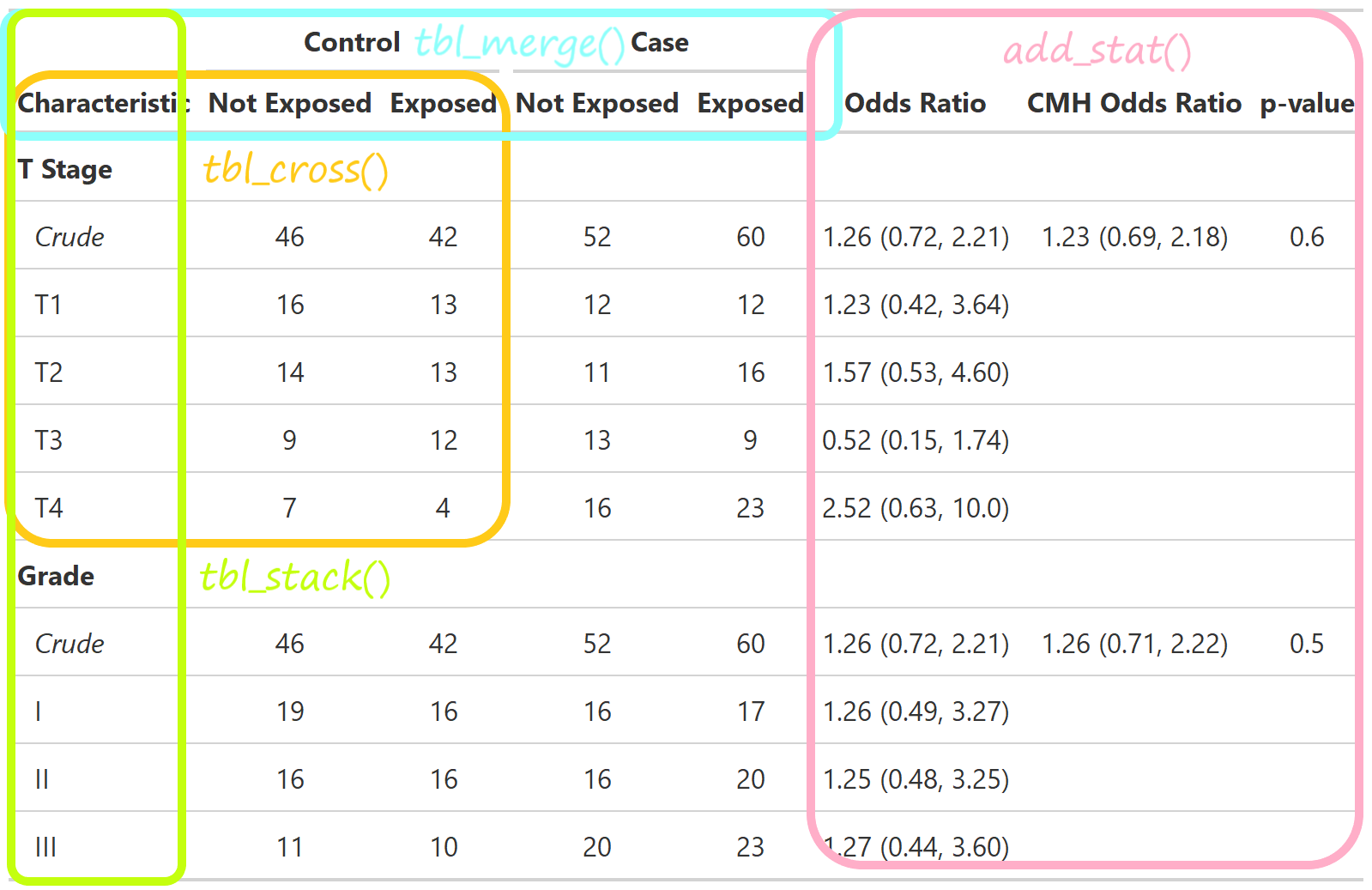
  • Stack and/or merge any table type
  • Use themes to standardize across tables
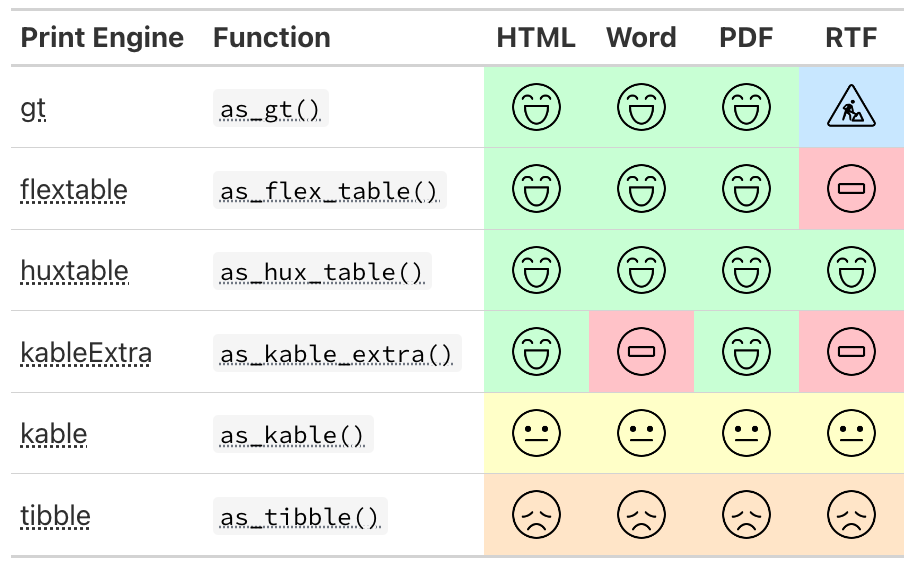
  • Choose from different print engines

{gtsummary} overview

We will focus on the following summary types as well as themes and print engines.

  • tbl_summary()

  • tbl_cross()

  • tbl_continuous()

  • tbl_wide_summary()

Example Dataset

  • The trial data set is included with {gtsummary}

  • Simulated data set of baseline characteristics for 200 patients who receive Drug A or Drug B

  • Variables were assigned labels using the labelled package

library(gtsummary)
library(tidyverse)
head(trial) |> gt::gt()
Chemotherapy Treatment Age Marker Level (ng/mL) T Stage Grade Tumor Response Patient Died Months to Death/Censor
Drug A 23 0.160 T1 II 0 0 24.00
Drug B 9 1.107 T2 I 1 0 24.00
Drug A 31 0.277 T1 II 0 0 24.00
Drug A NA 2.067 T3 III 1 1 17.64
Drug A 51 2.767 T4 III 1 1 16.43
Drug B 39 0.613 T4 I 0 1 15.64

Example Dataset

This presentation will use a subset of the variables.

sm_trial <-
  trial |> 
  select(trt, age, grade, response)
Variable Label
trt Chemotherapy Treatment
age Age
grade Grade
response Tumor Response

tbl_summary()

Basic tbl_summary()

sm_trial |> 
  select(-trt) |>  
  tbl_summary()
Characteristic N = 2001
Age 47 (38, 57)
    Unknown 11
Grade
    I 68 (34%)
    II 68 (34%)
    III 64 (32%)
Tumor Response 61 (32%)
    Unknown 7
1 Median (Q1, Q3); n (%)
  • Four types of summaries: continuous, continuous2, categorical, and dichotomous

  • Statistics are median (IQR) for continuous, n (%) for categorical/dichotomous

  • Variables coded 0/1, TRUE/FALSE, Yes/No treated as dichotomous

  • Lists NA values under “Unknown”

  • Label attributes are printed automatically

Customize tbl_summary() output

tbl_summary(
  sm_trial,
  by = trt,
)
Characteristic Drug A
N = 981
Drug B
N = 1021
Age 46 (37, 60) 48 (39, 56)
    Unknown 7 4
Grade

    I 35 (36%) 33 (32%)
    II 32 (33%) 36 (35%)
    III 31 (32%) 33 (32%)
Tumor Response 28 (29%) 33 (34%)
    Unknown 3 4
1 Median (Q1, Q3); n (%)
  • by: specify a column variable for cross-tabulation

Customize tbl_summary() output

tbl_summary(
  sm_trial,
  by = trt,
  type = age ~ "continuous2",
)
Characteristic Drug A
N = 981
Drug B
N = 1021
Age

    Median (Q1, Q3) 46 (37, 60) 48 (39, 56)
    Unknown 7 4
Grade

    I 35 (36%) 33 (32%)
    II 32 (33%) 36 (35%)
    III 31 (32%) 33 (32%)
Tumor Response 28 (29%) 33 (34%)
    Unknown 3 4
1 n (%)
  • by: specify a column variable for cross-tabulation

  • type: specify the summary type

Customize tbl_summary() output

tbl_summary(
  sm_trial,
  by = trt,
  type = age ~ "continuous2",
  statistic = 
    list(
      age ~ c("{mean} ({sd})", 
              "{min}, {max}"), 
      response ~ "{n} / {N} ({p}%)"
    ),
)
Characteristic Drug A
N = 981
Drug B
N = 1021
Age

    Mean (SD) 47 (15) 47 (14)
    Min, Max 6, 78 9, 83
    Unknown 7 4
Grade

    I 35 (36%) 33 (32%)
    II 32 (33%) 36 (35%)
    III 31 (32%) 33 (32%)
Tumor Response 28 / 95 (29%) 33 / 98 (34%)
    Unknown 3 4
1 n (%); n / N (%)
  • by: specify a column variable for cross-tabulation

  • type: specify the summary type

  • statistic: customize the reported statistics

Customize tbl_summary() output

tbl_summary(
  sm_trial,
  by = trt,
  type = age ~ "continuous2",
  statistic = 
    list(
      age ~ c("{mean} ({sd})", 
              "{min}, {max}"), 
      response ~ "{n} / {N} ({p}%)"
    ),
  label = 
    grade ~ "Pathologic tumor grade",
)
Characteristic Drug A
N = 981
Drug B
N = 1021
Age

    Mean (SD) 47 (15) 47 (14)
    Min, Max 6, 78 9, 83
    Unknown 7 4
Pathologic tumor grade

    I 35 (36%) 33 (32%)
    II 32 (33%) 36 (35%)
    III 31 (32%) 33 (32%)
Tumor Response 28 / 95 (29%) 33 / 98 (34%)
    Unknown 3 4
1 n (%); n / N (%)
  • by: specify a column variable for cross-tabulation

  • type: specify the summary type

  • statistic: customize the reported statistics

  • label: change or customize variable labels

Customize tbl_summary() output

tbl_summary(
  sm_trial,
  by = trt,
  type = age ~ "continuous2",
  statistic = 
    list(
      age ~ c("{mean} ({sd})", 
              "{min}, {max}"), 
      response ~ "{n} / {N} ({p}%)"
    ),
  label = 
    grade ~ "Pathologic tumor grade",
  digits = age ~ list(sd = 1) # report SD(age) to one decimal place
)
Characteristic Drug A
N = 981
Drug B
N = 1021
Age

    Mean (SD) 47 (14.7) 47 (14.0)
    Min, Max 6, 78 9, 83
    Unknown 7 4
Pathologic tumor grade

    I 35 (36%) 33 (32%)
    II 32 (33%) 36 (35%)
    III 31 (32%) 33 (32%)
Tumor Response 28 / 95 (29%) 33 / 98 (34%)
    Unknown 3 4
1 n (%); n / N (%)
  • by: specify a column variable for cross-tabulation

  • type: specify the summary type

  • statistic: customize the reported statistics

  • label: change or customize variable labels

  • digits: specify the number of decimal places for rounding

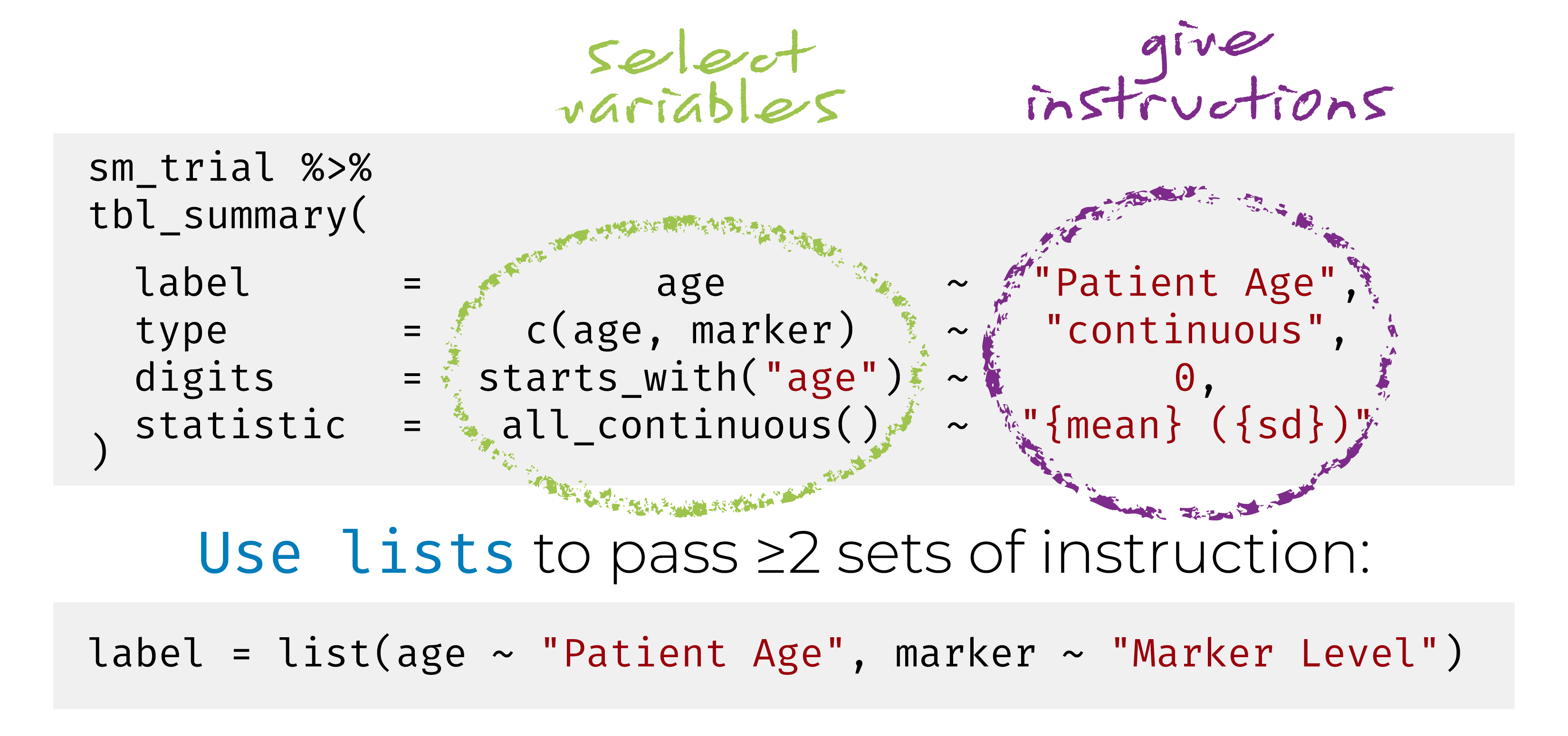
{gtsummary} + formulas

This syntax is also used in {cards}, {cardx}, and {gt}.

Named list are OK too! label = list(age = "Patient Age")

{gtsummary} selectors

  • Use the following helpers to select groups of variables: all_continuous(), all_categorical()

  • Use all_stat_cols() to select the summary statistic columns

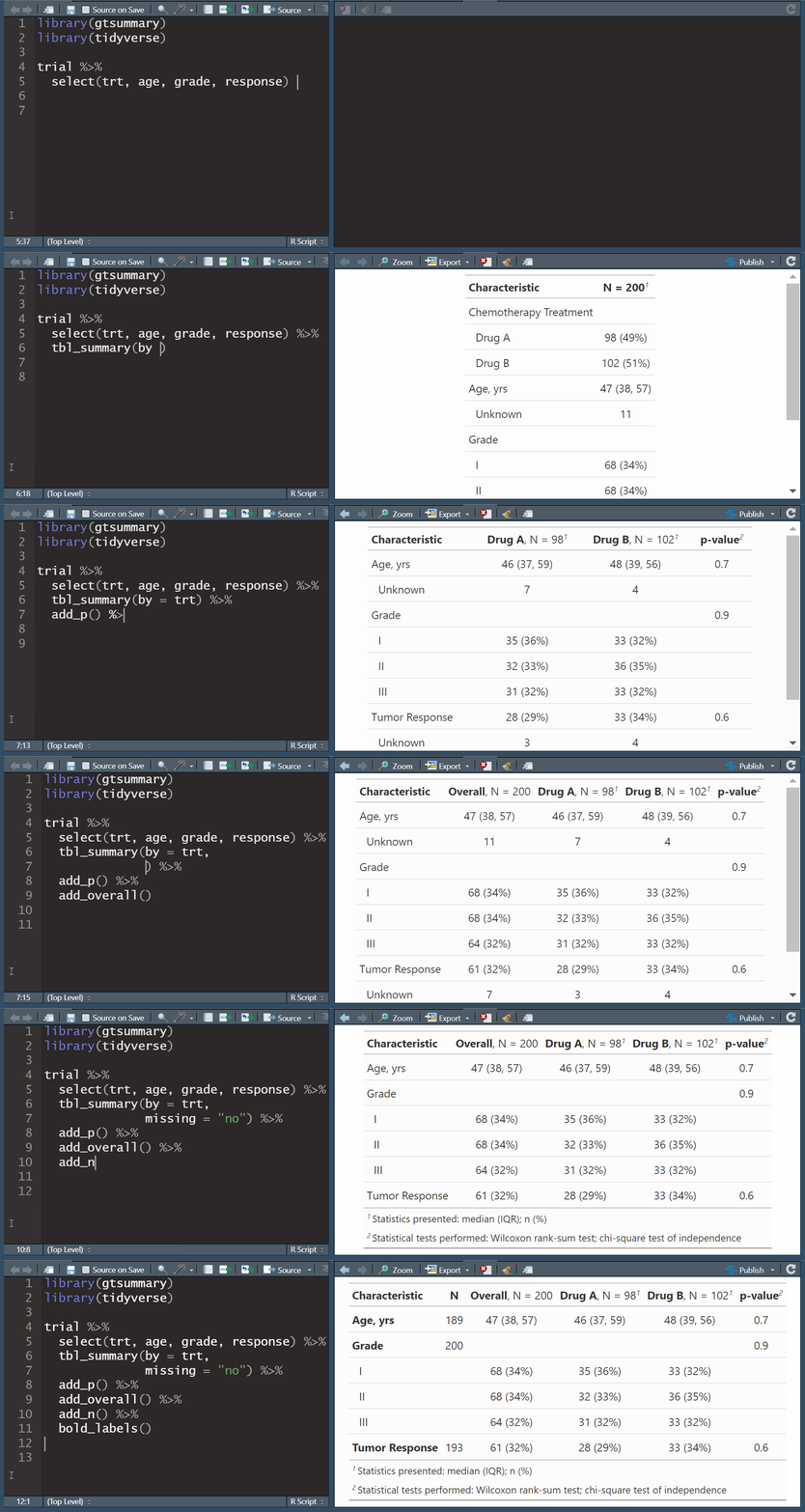
Add-on functions in {gtsummary}

tbl_summary() objects can also be updated using related functions.

  • add_*() add additional column of statistics or information, e.g. p-values, q-values, overall statistics, treatment differences, N obs., and more

  • modify_*() modify table headers, spanning headers, footnotes, and more

  • bold_*()/italicize_*() style labels, variable levels, significant p-values

Update tbl_summary() with add_*()

sm_trial |>
  tbl_summary(
    by = trt
  ) |> 
  add_p() |> 
  add_q(method = "fdr")
Characteristic Drug A
N = 981
Drug B
N = 1021
p-value2 q-value3
Age 46 (37, 60) 48 (39, 56) 0.7 0.9
    Unknown 7 4

Grade

0.9 0.9
    I 35 (36%) 33 (32%)

    II 32 (33%) 36 (35%)

    III 31 (32%) 33 (32%)

Tumor Response 28 (29%) 33 (34%) 0.5 0.9
    Unknown 3 4

1 Median (Q1, Q3); n (%)
2 Wilcoxon rank sum test; Pearson’s Chi-squared test
3 False discovery rate correction for multiple testing
  • add_p(): adds a column of p-values

  • add_q(): adds a column of p-values adjusted for multiple comparisons through a call to p.adjust()

Update tbl_summary() with add_*()

sm_trial |>
  tbl_summary(
    by = trt,
    missing = "no"
  ) |> 
  add_overall()
Characteristic Overall
N = 2001
Drug A
N = 981
Drug B
N = 1021
Age 47 (38, 57) 46 (37, 60) 48 (39, 56)
Grade


    I 68 (34%) 35 (36%) 33 (32%)
    II 68 (34%) 32 (33%) 36 (35%)
    III 64 (32%) 31 (32%) 33 (32%)
Tumor Response 61 (32%) 28 (29%) 33 (34%)
1 Median (Q1, Q3); n (%)
  • add_overall(): adds a column of overall statistics

Update tbl_summary() with add_*()

sm_trial |>
  tbl_summary(
    by = trt,
    missing = "no"
  ) |> 
  add_overall() |> 
  add_n()
Characteristic N Overall
N = 2001
Drug A
N = 981
Drug B
N = 1021
Age 189 47 (38, 57) 46 (37, 60) 48 (39, 56)
Grade 200


    I
68 (34%) 35 (36%) 33 (32%)
    II
68 (34%) 32 (33%) 36 (35%)
    III
64 (32%) 31 (32%) 33 (32%)
Tumor Response 193 61 (32%) 28 (29%) 33 (34%)
1 Median (Q1, Q3); n (%)
  • add_overall(): adds a column of overall statistics
  • add_n(): adds a column with the sample size

Update tbl_summary() with add_*()

sm_trial |>
  tbl_summary(
    by = trt,
    missing = "no"
  ) |> 
  add_overall() |> 
  add_n() |> 
  add_stat_label(
    label = all_categorical() ~ "No. (%)"
  ) 
Characteristic N Overall
N = 200
Drug A
N = 98
Drug B
N = 102
Age, Median (Q1, Q3) 189 47 (38, 57) 46 (37, 60) 48 (39, 56)
Grade, No. (%) 200


    I
68 (34%) 35 (36%) 33 (32%)
    II
68 (34%) 32 (33%) 36 (35%)
    III
64 (32%) 31 (32%) 33 (32%)
Tumor Response, No. (%) 193 61 (32%) 28 (29%) 33 (34%)
  • add_overall(): adds a column of overall statistics
  • add_n(): adds a column with the sample size
  • add_stat_label(): adds a description of the reported statistic

Update with bold_*()/italicize_*()

sm_trial |>
  tbl_summary(
    by = trt
  ) |>
  add_p() |> 
  bold_labels() |> 
  italicize_levels() |> 
  bold_p(t = 0.8)
Characteristic Drug A
N = 981
Drug B
N = 1021
p-value2
Age 46 (37, 60) 48 (39, 56) 0.7
    Unknown 7 4
Grade

0.9
    I 35 (36%) 33 (32%)
    II 32 (33%) 36 (35%)
    III 31 (32%) 33 (32%)
Tumor Response 28 (29%) 33 (34%) 0.5
    Unknown 3 4
1 Median (Q1, Q3); n (%)
2 Wilcoxon rank sum test; Pearson’s Chi-squared test
  • bold_labels(): bold the variable labels
  • italicize_levels(): italicize the variable levels
  • bold_p(): bold p-values according a specified threshold

Update tbl_summary() with modify_*()

tbl <-
  sm_trial |> 
  tbl_summary(by = trt, 
              missing = "no") |>
  modify_header(
      stat_1 ~ "**Group A**",
      stat_2 ~ "**Group B**"
  ) |> 
  modify_spanning_header(
    all_stat_cols() ~ "**Drug**") |> 
  modify_footnote(
    all_stat_cols() ~ 
      paste("median (IQR) for continuous;",
            "n (%) for categorical")
  )
tbl
Characteristic
Drug
Group A1 Group B1
Age 46 (37, 60) 48 (39, 56)
Grade

    I 35 (36%) 33 (32%)
    II 32 (33%) 36 (35%)
    III 31 (32%) 33 (32%)
Tumor Response 28 (29%) 33 (34%)
1 median (IQR) for continuous; n (%) for categorical
  • Use show_header_names() to see the internal header names available for use in modify_header()

Column names

show_header_names(tbl)
Column Name   Header                 level*         N*          n*          p*             
label         "**Characteristic**"                  200 <int>                              
stat_1        "**Group A**"          Drug A <chr>   200 <int>    98 <int>   0.490 <dbl>    
stat_2        "**Group B**"          Drug B <chr>   200 <int>   102 <int>   0.510 <dbl>    
* These values may be dynamically placed into headers (and other locations).
ℹ Review the `modify_header()` (`?gtsummary::modify()`) help for examples.


all_stat_cols() selects columns "stat_1" and "stat_2"

Update tbl_summary() with add_*()

trial |>
  select(trt, marker, response) |>
  tbl_summary(
    by = trt,
    statistic = list(marker ~ "{mean} ({sd})",
                     response ~ "{p}%"),
    missing = "no"
  ) |> 
  add_difference()
Characteristic Drug A
N = 981
Drug B
N = 1021
Difference2 95% CI2,3 p-value2
Marker Level (ng/mL) 1.02 (0.89) 0.82 (0.83) 0.20 -0.05, 0.44 0.12
Tumor Response 29% 34% -4.2% -18%, 9.9% 0.6
1 Mean (SD); %
2 Welch Two Sample t-test; 2-sample test for equality of proportions with continuity correction
3 CI = Confidence Interval
  • add_difference(): mean and rate differences between two groups. Can also be adjusted differences

Update tbl_summary() with add_*()

sm_trial |>
  tbl_summary(
    by = trt,
    missing = "no"
  ) |> 
  add_stat(...)
  • Customize statistics presented with add_stat()

  • Added statistics can be placed on the label or the level rows

  • Added statistics may be a single column or multiple

Where are the ARDs?

  • ARDs are the backbone for all calculations in gtsummary

  • Every gtsummary table saves the ARDs from each calculation

  • They can be extracted individually, or combined.

tbl <- tbl_summary(trial, by = trt) |> add_p()

gather_ard(tbl)[["add_p"]][["age"]]
{cards} data frame: 15 x 9
   group1 variable   context   stat_name stat_label      stat
1     trt      age stats_wi…    estimate  Median o…        -1
2     trt      age stats_wi…   statistic  X-square…      4323
3     trt      age stats_wi…     p.value    p-value     0.718
4     trt      age stats_wi…    conf.low  CI Lower…        -5
5     trt      age stats_wi…   conf.high  CI Upper…         4
6     trt      age stats_wi…      method     method Wilcoxon…
7     trt      age stats_wi… alternative  alternat… two.sided
8     trt      age stats_wi…          mu         mu         0
9     trt      age stats_wi…      paired  Paired t…     FALSE
10    trt      age stats_wi…       exact      exact          
11    trt      age stats_wi…     correct    correct      TRUE
12    trt      age stats_wi…    conf.int   conf.int      TRUE
13    trt      age stats_wi…  conf.level  CI Confi…      0.95
14    trt      age stats_wi…    tol.root   tol.root         0
15    trt      age stats_wi… digits.rank  digits.r…       Inf
ℹ 3 more variables: fmt_fn, warning, error

Add-on functions in {gtsummary}

And many more!

See the documentation at http://www.danieldsjoberg.com/gtsummary/reference/index.html

And a detailed tbl_summary() vignette at http://www.danieldsjoberg.com/gtsummary/articles/tbl_summary.html

Cross-tabulation with tbl_cross()

tbl_cross() is a wrapper for tbl_summary() for n x m tables

sm_trial |>
  tbl_cross(
    row = trt, 
    col = grade,
    percent = "row",
    margin = "row"
  ) |>
  add_p(source_note = TRUE) |>
  bold_labels()
Grade
I II III
Chemotherapy Treatment


    Drug A 35 (36%) 32 (33%) 31 (32%)
    Drug B 33 (32%) 36 (35%) 33 (32%)
Total 68 (34%) 68 (34%) 64 (32%)
Pearson’s Chi-squared test, p=0.9

Continuous Summaries with tbl_continuous()

tbl_continuous() summarizes a continuous variable by 1, 2, or more categorical variables

sm_trial |>
  tbl_continuous(
    variable = age,
    by = trt,
    include = grade
  )
Characteristic Drug A
N = 981
Drug B
N = 1021
Grade

    I 46 (36, 60) 48 (42, 55)
    II 45 (31, 55) 51 (42, 58)
    III 52 (42, 61) 45 (36, 52)
1 Age: Median (Q1, Q3)

Wide Summaries with tbl_wide_summary()

tbl_wide_summary() summarizes a continuous variable with summary statistics spread across columns

trial |>
  tbl_wide_summary(include = c(response, grade))
Characteristic n %
Tumor Response 61 32%
Grade

    I 68 34%
    II 68 34%
    III 64 32%

Wide Summaries with tbl_wide_summary()

trial |>
  tbl_wide_summary(include = c(age, marker))
Characteristic Median Q1, Q3
Age 47 38, 57
Marker Level (ng/mL) 0.64 0.22, 1.41

Naturally, you can change the statistics, and which appear in each column.

tbl_merge()/tbl_stack()

tbl_merge() for side-by-side tables

tbl_n <- 
  tbl_summary(trial, include = grade, statistic = grade ~ "{n}") |> 
  modify_header(all_stat_cols() ~ "**N**") |> # update column header
  modify_footnote(all_stat_cols() ~ NA) # remove footnote
tbl_age <-
  tbl_continuous(trial, include = grade, variable = age, by = trt) |> 
  modify_header(all_stat_cols() ~ "**{level}**") # update header

# combine the tables side by side
list(tbl_n, tbl_age) |> 
  tbl_merge(tab_spanner = FALSE) # suppress default header
Characteristic N Drug A1 Drug B1
Grade


    I 68 46 (36, 60) 48 (42, 55)
    II 68 45 (31, 55) 51 (42, 58)
    III 64 52 (42, 61) 45 (36, 52)
1 Age: Median (Q1, Q3)

tbl_stack() to combine vertically

tbl_drug_a <- trial |> 
  dplyr::filter(trt == "Drug A") |> 
  tbl_summary(include = c(response, death), missing = "no")
tbl_drug_b <- trial |> 
  dplyr::filter(trt == "Drug B") |> 
  tbl_summary(include = c(response, death), missing = "no")

# stack the two tables 
list(tbl_drug_a, tbl_drug_b) |> 
  tbl_stack(group_header = c("Drug A", "Drug B")) |> # optionally include headers for each table
  modify_header(all_stat_cols() ~ "**Outcome Rates**")
Characteristic Outcome Rates1
Drug A
Tumor Response 28 (29%)
Patient Died 52 (53%)
Drug B
Tumor Response 33 (34%)
Patient Died 60 (59%)
1 n (%)

tbl_strata() for stratified tables

tbl_strata(
  trial, 
  strata = trt, 
  ~ .x |> 
    tbl_wide_summary(include = c(response, death))
)
Characteristic
Drug A
Drug B
n % n %
Tumor Response 28 29% 33 34%
Patient Died 52 53% 60 59%

The default is to combine stratified tables with tbl_merge().

tbl_strata() for stratified tables

We can also stack the tables.

tbl_strata(
  trial, 
  strata = trt, 
  ~ .x |> 
    tbl_wide_summary(include = c(response, death)),
  .combine_with = "tbl_stack"
)
Characteristic n %
Drug A
Tumor Response 28 29%
Patient Died 52 53%
Drug B
Tumor Response 33 34%
Patient Died 60 59%

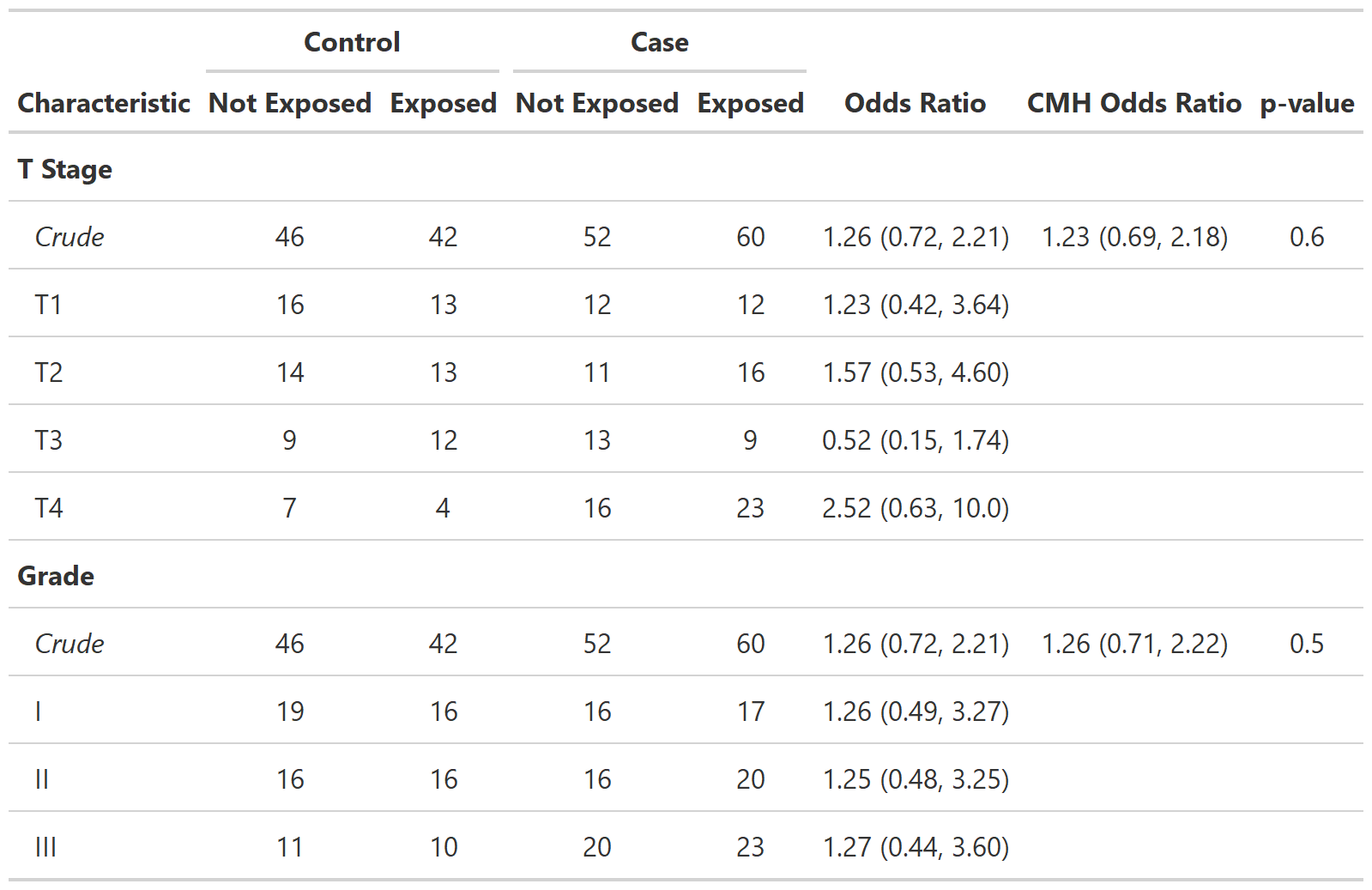
Define custom function tbl_cmh()

Define custom function tbl_cmh()

Cobbling Tables Together

  • Most of the tables we create in the pharma space come from a catalog of standard tables.

  • Custom or one-off tables are often quite difficult and time intensive to create.

  • The {gtsummary} package makes it simple to break complex tables into their simple parts and cobble them together in the end.

  • Moreover, the internal structure of a gtsummary table is super simple: a data frame and instructions on how to print that data frame to make it cute. If needed, you can directly modify the underlying data frame with modify_table_body().

trial |> tbl_summary(include = c(age, grade), by = trt) |> purrr::pluck("table_body")
# A tibble: 6 × 7
  variable var_type    row_type var_label label   stat_1      stat_2     
  <chr>    <chr>       <chr>    <chr>     <chr>   <chr>       <chr>      
1 age      continuous  label    Age       Age     46 (37, 60) 48 (39, 56)
2 age      continuous  missing  Age       Unknown 7           4          
3 grade    categorical label    Grade     Grade   <NA>        <NA>       
4 grade    categorical level    Grade     I       35 (36%)    33 (32%)   
5 grade    categorical level    Grade     II      32 (33%)    36 (35%)   
6 grade    categorical level    Grade     III     31 (32%)    33 (32%)   

ARD-first tables

ARD-first Tables

Similar to functions that accept a data frame, the package exports functions with nearly identical APIs that accept an ARD.

tbl_summary()

tbl_continuous()

tbl_wide_summary()
tbl_ard_summary()

tbl_ard_continuous()

tbl_ard_wide_summary()

ARD-first Tables

We can use the skills we learned earlier today to create ARDs for gtsummary tables.

library(cards)

ard <- ard_stack(
  data = trial, 
  ard_continuous(variables = age),
  ard_categorical(variables = grade),
  ard_dichotomous(variables = response),
  # add these for best-looking tables
  .attributes = TRUE, 
  .missing = TRUE 
)
ard
   variable variable_level   context stat_name stat_label   stat
1       age                continuo…         N          N    189
2       age                continuo…      mean       Mean 47.238
3       age                continuo…        sd         SD 14.312
4       age                continuo…    median     Median     47
5       age                continuo…       p25         Q1     38
6       age                continuo…       p75         Q3     57
7       age                continuo…       min        Min      6
8       age                continuo…       max        Max     83
9       age                  missing     N_obs  Vector L…    200
10      age                  missing    N_miss  N Missing     11

ARD-first Tables

We can simply use the ARD from the previous slide, and pass it to tbl_ard_summary() for a summary table.

tbl_ard_summary(ard)
Characteristic Overall1
Age 47.0 (38.0, 57.0)
Grade
    I 68 (34.0%)
    II 68 (34.0%)
    III 64 (32.0%)
Tumor Response 61 (31.6%)
1 Median (Q1, Q3); n (%)

ARD-first Tables

Now let’s try a somewhat more complicated table.

trial |> 
  labelled::set_variable_labels(age = "Age, years") |> 
  ard_stack( 
    .by = trt,
    ard_continuous(
      variables = age,
      fmt_fn = age ~ list(sd = 2)
    ),
    ard_categorical(variables = grade),
    ard_dichotomous(variables = response),
    # add these for best-looking tables
    .attributes = TRUE, 
    .missing = TRUE 
  ) |> 
  tbl_ard_summary(
    by = trt,
    type = all_continuous() ~ "continuous2",
    statistic = all_continuous() ~ c("{mean} ({sd})", "{min} - {max}"),
    missing = "no"
  ) |> 
  modify_caption("**Table 1. Subject Demographics**")

ARD-first Tables

Table 1. Subject Demographics
Characteristic Drug A1 Drug B1
Age, years

    Mean (SD) 47.0 (14.71) 47.4 (14.01)
    Min - Max 6.0 - 78.0 9.0 - 83.0
Grade

    I 35 (35.7%) 33 (32.4%)
    II 32 (32.7%) 36 (35.3%)
    III 31 (31.6%) 33 (32.4%)
Tumor Response 28 (29.5%) 33 (33.7%)
1 n (%)

ARD-first Table Shells

trial |> 
  labelled::set_variable_labels(age = "Age, years") |> 
  ard_stack( 
    .by = trt,
    ard_continuous(
      variables = age,
      fmt_fn = age ~ list(sd = 2)
    ),
    ard_categorical(variables = grade),
    ard_dichotomous(variables = response),
    # add these for best-looking tables
    .attributes = TRUE, 
    .missing = TRUE 
  ) |> 
  dplyr::mutate(fmt_fn = list(\(x) "xx.x")) |> 
  tbl_ard_summary(
    by = trt,
    type = all_continuous() ~ "continuous2",
    statistic = all_continuous() ~ c("{mean} ({sd})", "{min} - {max}"),
    missing = "no"
  ) |> 
  modify_header(all_stat_cols() ~ "**{level}**  \nN = xx")

ARD-first Table Shells

Characteristic Drug A
N = xx1
Drug B
N = xx1
Age, years

    Mean (SD) xx.x (xx.x) xx.x (xx.x)
    Min - Max xx.x - xx.x xx.x - xx.x
Grade

    I xx.x (xx.x%) xx.x (xx.x%)
    II xx.x (xx.x%) xx.x (xx.x%)
    III xx.x (xx.x%) xx.x (xx.x%)
Tumor Response xx.x (xx.x%) xx.x (xx.x%)
1 n (%)

{gtsummary} themes

{gtsummary} theme basics

  • A theme is a set of customization preferences that can be easily set and reused.

  • Themes control default settings for existing functions

  • Themes control more fine-grained customization not available via arguments or helper functions

  • Easily use one of the available themes, or create your own

{gtsummary} default theme

reset_gtsummary_theme()

trial |> 
  tbl_summary(
    by = trt, 
    include = c(age, response)
  ) |>
  modify_caption(
    "Default Theme"
  )
Default Theme
Characteristic Drug A
N = 981
Drug B
N = 1021
Age 46 (37, 60) 48 (39, 56)
    Unknown 7 4
Tumor Response 28 (29%) 33 (34%)
    Unknown 3 4
1 Median (Q1, Q3); n (%)

{gtsummary} theme_gtsummary_journal()

reset_gtsummary_theme()
theme_gtsummary_journal(journal = "jama")

trial |> 
  tbl_summary(
    by = trt, 
    include = c(age, response)
  ) |>
  modify_caption(
    "Journal Theme (JAMA)"
  )
Journal Theme (JAMA)
Characteristic Drug A
N = 98
Drug B
N = 102
Age, Median (IQR) 46 (37 – 60) 48 (39 – 56)
    Unknown 7 4
Tumor Response, n (%) 28 (29) 33 (34)
    Unknown 3 4

{gtsummary} theme_gtsummary_language()

reset_gtsummary_theme()
theme_gtsummary_language(language = "zh-tw")

trial |> 
  tbl_summary(
    by = trt, 
    include = c(age, response)
  ) |>
  add_p() |> 
  modify_caption(
    "Language Theme (Chinese)"
  )
Language Theme (Chinese)
特色 Drug A
N = 981
Drug B
N = 1021
P 值2
Age 46 (37, 60) 48 (39, 56) 0.7
    未知 7 4
Tumor Response 28 (29%) 33 (34%) 0.5
    未知 3 4
1 中位數 (Q1, Q3); n (%)
2 Wilcoxon 排序和檢定; 卡方 獨立性檢定

Language options:

  • German
  • English
  • Spanish
  • French
  • Gujarati
  • Hindi
  • Icelandic
  • Japanese
  • Korean
  • Marathi
  • Dutch
  • Norwegian
  • Portuguese
  • Swedish
  • Chinese Simplified
  • Chinese Traditional

{gtsummary} theme_gtsummary_compact()

reset_gtsummary_theme()
theme_gtsummary_compact()

trial |> 
  tbl_summary(
    by = trt, 
    include = c(age, response)
  ) |>
  modify_caption("Compact Theme")
Compact Theme
Characteristic Drug A
N = 981
Drug B
N = 1021
Age 46 (37, 60) 48 (39, 56)
    Unknown 7 4
Tumor Response 28 (29%) 33 (34%)
    Unknown 3 4
1 Median (Q1, Q3); n (%)

Reduces padding and font size

A pharma theme?

While not yet exported from gtsummary, we can create a theme for tables that look more like what we expect in pharma.

  • Fixed-width font

  • Continuous variable summaries default to multi-line

  • Function for rounding percentages includes leading white space

  • Default right alignment on summary statistics

Characteristic Placebo
N = 86
Xanomeline Low Dose
N = 84
Xanomeline High Dose
N = 84
Age


    Median (Q1, Q3) 76.0 (69.0, 82.0) 77.5 (71.0, 82.0) 76.0 (70.5, 80.0)
    Mean (SD) 75.2 (8.6) 75.7 (8.3) 74.4 (7.9)
    Min - Max 52.0 - 89.0 51.0 - 88.0 56.0 - 88.0
Age Group, n (%)


    <65 14 (16.3%) 8 ( 9.5%) 11 (13.1%)
    65-80 42 (48.8%) 47 (56.0%) 55 (65.5%)
    >80 30 (34.9%) 29 (34.5%) 18 (21.4%)
Female, n (%) 53 (61.6%) 50 (59.5%) 40 (47.6%)

{gtsummary} set_gtsummary_theme()

  • set_gtsummary_theme() to use a custom theme.

  • See the {gtsummary} + themes vignette for examples

http://www.danieldsjoberg.com/gtsummary/articles/themes.html

{gtsummary} print engines

{gtsummary} print engines

{gtsummary} print engines

Use any print engine to customize table

library(gt)
trial |>
  select(age, grade) |>
  tbl_summary() |>
  as_gt() |>
  cols_width(label ~ px(300)) |>
  cols_align(columns = stat_0, 
             align = "left")
Characteristic N = 2001
Age 47 (38, 57)
    Unknown 11
Grade
    I 68 (34%)
    II 68 (34%)
    III 64 (32%)
1 Median (Q1, Q3); n (%)

In Closing

{gtsummary} website

http://www.danieldsjoberg.com/gtsummary/

Package Authors/Contributors

Daniel D. Sjoberg

Joseph Larmarange

Michael Curry

Jessica Lavery

Karissa Whiting

Emily C. Zabor

Xing Bai

Esther Drill

Jessica Flynn

Margie Hannum

Stephanie Lobaugh

Shannon Pileggi

Amy Tin

Gustavo Zapata Wainberg

Other Contributors

@abduazizR, @ablack3, @ABohynDOE, @ABorakati, @adilsonbauhofer, @aghaynes, @ahinton-mmc, @aito123, @akarsteve, @akefley, @albamrt, @albertostefanelli, @alecbiom, @alexandrayas, @alexis-catherine, @AlexZHENGH, @alnajar, @amygimma, @anaavu, @anddis, @andrader, @Andrzej-Andrzej, @angelgar, @arbet003, @arnmayer, @aspina7, @AurelienDasre, @awcm0n, @ayogasekaram, @barretmonchka, @barthelmes, @bc-teixeira, @bcjaeger, @BeauMeche, @benediktclaus, @benwhalley, @berg-michael, @bhattmaulik, @BioYork, @blue-abdur, @brachem-christian, @brianmsm, @browne123, @bwiernik, @bx259, @calebasaraba, @CarolineXGao, @CharlyMarie, @ChongTienGoh, @Chris-M-P, @chrisleitzinger, @cjprobst, @ClaudiaCampani, @clmawhorter, @CodieMonster, @coeusanalytics, @coreysparks, @CorradoLanera, @crystalluckett-sanofi, @ctlamb, @dafxy, @DanChaltiel, @DanielPark-MGH, @davideyre, @davidgohel, @davidkane9, @DavisVaughan, @dax44, @dchiu911, @ddsjoberg, @DeFilippis, @denis-or, @dereksonderegger, @derekstein, @DesiQuintans, @dieuv0, @dimbage, @discoleo, @djbirke, @dmenne, @DrDinhLuong, @edelarua, @edrill, @Eduardo-Auer, @ElfatihHasabo, @emilyvertosick, @eokoshi, @ercbk, @eremingt, @erikvona, @eugenividal, @eweisbrod, @fdehrich, @feizhadj, @fh-jsnider, @fh-mthomson, @FrancoisGhesquiere, @ge-generation, @Generalized, @ghost, @giorgioluciano, @giovannitinervia9, @gjones1219, @gorkang, @GuiMarthe, @gungorMetehan, @hass91, @hescalar, @HichemLa, @hichew22, @hr70, @huftis, @hughjonesd, @iaingallagher, @ilyamusabirov, @IndrajeetPatil, @irene9116, @IsadoraBM, @j-tamad, @jalavery, @jaromilfrossard, @JBarsotti, @jbtov, @jeanmanguy, @jemus42, @jenifav, @jennybc, @JeremyPasco, @jerrodanzalone, @JesseRop, @jflynn264, @jhchou, @jhelvy, @jhk0530, @jjallaire, @jkylearmstrong, @jmbarajas, @jmbarbone, @JoanneF1229, @joelgautschi, @johnryan412, @JohnSodling, @jonasrekdalmathisen, @JonGretar, @jordan49er, @jsavinc, @jthomasmock, @juseer, @jwilliman, @karissawhiting, @karl-an, @kendonB, @kentm4, @klh281, @kmdono02, @kristyrobledo, @kwakuduahc1, @lamberp6, @lamhine, @larmarange, @ledermanr, @leejasme, @leslem, @levossen, @lngdet, @longjp, @lorenzoFabbri, @loukesio, @love520lfh, @lspeetluk, @ltin1214, @ltj-github, @lucavd, @LucyMcGowan, @LuiNov, @lukejenner6, @maciekbanas, @maia-sh, @malcolmbarrett, @mariamaseng, @Marsus1972, @martsobm, @Mathicaa, @matthieu-faron, @maxanes, @mayazadok2, @mbac, @mdidish, @medewitt, @meenakshi-kushwaha, @melindahiggins2000, @MelissaAssel, @Melkiades, @mfansler, @michaelcurry1123, @mikemazzucco, @mlamias, @mljaniczek, @moleps, @monitoringhsd, @motocci, @mrmvergeer, @msberends, @mvuorre, @myamortor, @myensr, @MyKo101, @nalimilan, @ndunnewind, @nikostr, @ningyile, @O16789, @oliviercailloux, @oranwutang, @palantre, @parmsam, @Pascal-Schmidt, @PaulC91, @paulduf, @pedersebastian, @perlatex, @pgseye, @philippemichel, @philsf, @polc1410, @Polperobis, @postgres-newbie, @proshano, @raphidoc, @RaviBot, @rawand-hanna, @rbcavanaugh, @remlapmot, @rich-iannone, @RiversPharmD, @rmgpanw, @roaldarbol, @roman2023, @ryzhu75, @s-j-choi, @sachijay, @saifelayan, @sammo3182, @samrodgersmelnick, @samuele-mercan, @sandhyapc, @sbalci, @sda030, @shah-in-boots, @shannonpileggi, @shaunporwal, @shengchaohou, @ShixiangWang, @simonpcouch, @slb2240, @slobaugh, @spiralparagon, @Spring75xx, @StaffanBetner, @steenharsted, @stenw, @Stephonomon, @storopoli, @stratopopolis, @strengejacke, @szimmer, @tamytsujimoto, @TAOS25, @TarJae, @themichjam, @THIB20, @tibirkrajc, @tjmeyers, @tldrcharlene, @tormodb, @toshifumikuroda, @TPDeramus, @UAB-BST-680, @uakimix, @uriahf, @Valja64, @viola-hilbert, @violet-nova, @vvm02, @will-gt, @xkcococo, @xtimbeau, @yatirbe, @yihunzeleke, @yonicd, @yoursdearboy, @YousufMohammed2002, @yuryzablotski, @zabore, @zachariae, @zaddyzad, @zawkzaw, @zdz2101, @zeyunlu, @zhangkaicr, @zhaohongxin0, @zheer-kejlberg, @zhengnow, @zhonghua723, @zlkrvsm, @zongell-star, and @Zoulf001.

Thank you

Ask on stackoverflow.com

Use the gtsummary tag

Thousands of posts!

More on ARDs at the 2024 R/Pharma Workshop